
If you’re serious about LinkedIn as a marketing channel (and you should be), your target audience needs to believe you’re a credible source for them. In this article, you’ll discover the top strategies, tactics, and tools well-paid LinkedIn creators are using today to establish their credibility and earn more.
And if you haven’t already, check out the first two articles in this ongoing series, helping you choose between becoming a LinkedIn creator or using the platform to generate leads for your business. And learn the difference between LinkedIn creators and thought leaders.
Start Niche, Then Expand
You might wonder, “How niche or broad should I go with my content?”
Tara Knight has worked with hundreds of LinkedIn creators through her own agency and as the COO of Creator Match. She believes that “creators who try to be everything to everyone right out the gate end up being nothing to no one.”
Starting with a niche, according to Tara, works because:
- It makes you the go-to person for a specific problem.
- It’s easier to get brand deals when you’re known for ONE expertise.
- Your audience knows why exactly they should follow you.
- You become memorable and referable when people can easily associate you with a topic or product.
- Content creation is easier when you have clear boundaries around what you will discuss.
You can later strategically expand into adjacent territories that make sense for your brand and core audience.
For example, you may start creating content about newsletter writing. Then, slowly branch out to topics like advertising, brand partnerships, and content monetization.
Tara concludes that a niche LinkedIn creator with 10,000 C-suite executive followers who see them as THE video expert will make way more money than a generalist creator with 100,000 followers who posts random business advice.
Actively Reach Out to Brands, Agencies, and Peers
The creators who land the most brand deals are the ones who are strategic in their outreach, says Tara. These are her three top outreach strategies…
1. Reach out to brands you already use and love
“When creators reach out to brands they genuinely already use and love, the pitch practically writes itself.”
You can highlight the product’s features and use cases most valuable to you as a customer. And the brand knows you’re interested in endorsing their product, not just cashing their check.
Tara suggests not asking for money in your first outreach. Instead, offer value first. Share a post featuring the brand/product, tag them in relevant content, and engage with their posts. When you later pitch a paid partnership, you’ll be a familiar name.
2. “Fill out the darn forms”
Tara says it’s shocking how many creators skip this ‘stupidly simple’ step. Agencies like Creator Match have interest forms or databases that creators can fill out so they can be easily matched with a brand.
Many creators don’t enter themselves into the system and miss out on highly relevant opportunities.
3. Network at industry events
The relationships you build in person will convert to opportunities faster than any cold email you’ll send. If you’re serious about landing creator partnerships, attend at least one industry conference a year.
Know Who to Hire and When
According to Gabby Beckford of Packs Light, “It’s time to hire when you start losing money or opportunities simply because you can’t keep up. When you become your own bottleneck. When things start slipping through the cracks.”
Gabby’s first hire was an operations and admin assistant to handle logistics, scheduling, and organization so she could focus on strategy and creativity.
Today, Gabby’s team includes an operations manager, a part-time content assistant, a customer service rep, and two agencies that handle accounting and web development.
“Having the right people in place lets me protect my creative energy and focus on high-level growth.”
Choose Your Content Format
Contrary to popular belief, Tara Knight says video is not necessary to be a LinkedIn creator.
“The most successful creators I work with through Creator Match do primarily text and image or carousel content. They’re landing brand deals in the $2K to $5K range consistently.”
This is because:
- Text and image content are easier to batch and systemize.
- Text and image posts have a low barrier to entry and are easier to create consistently.
- These formats are easier to consume for audiences scrolling LinkedIn at work.
- Text posts can accommodate more nuance and depth than videos.
- Text and images are more accessible and easier to consume at your own pace.
That said, video content has its own strengths:
- It builds trust and connection faster.
- You can show instead of telling your expertise.
- Video breaks through the noise in a text-heavy environment like LinkedIn.
- Video content accommodates different learning styles.
- Brands can promote creator videos as ads.
Tara recommends that you play to your strengths. Forcing yourself to stay consistent with video can lead to burnout if you aren’t naturally comfortable being on camera.
“Build your foundation with the content format that feels sustainable for you, then experiment with other formats from a place of curiosity rather than desperation.”
Ask for What You Want
Put yourself out there, as Ashley Amber Sava did in her recent post. In this post, Ashley invites brands that align with her message and vibe to collaborate with her, giving a few examples of what such collaboration might look like.
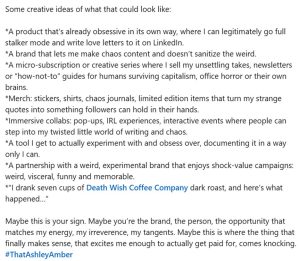
Take a leaf out of Ashley’s book and be more transparent about what you want. You just might get it.
Get the Top Tools LinkedIn Creators Use
Gabby Beckford shares her top creator tools:
- Copper CRM to manage sales pipelines and brand relationships
- Notion to store ideas, track projects, and collaborate with her team
- Gmail for communications and Google Drive to organize files, deliverables, and content
- ChatGPT for quick A/B testing, creative brainstorming, and writing assistance for drafting proposals or refining campaign concepts
Nicole Ramirez is a journalist-turned-content creator. Her top tools include:
- MagicPost for scheduling, analytics, and repurposing
- Canva for visuals and short-form edits
- ai for transcripts and content notes
- Google Keep and Trello to manage content ideas and publishing workflows
Kristi Lang, content creator at Buffer, recently recommended the DJI Osmo Pocket 3 vlogging camera for creators. Obviously, you’d only get this if you enjoy and are serious about video.
Jayde I. Powell, a social media strategist, LinkedIn creator, and speaker, recommends the following free tools:
- EmojiCopy to search, copy, and paste emojis in your LinkedIn posts on desktop
- Image Splitter for Carousels that turns an image into an aesthetic carousel
- TextFX for when you’re at a loss for words
- Text Manipulator to strike through a phrase or underline a word
- ColorZilla to use a digital eyedropper to pick and choose a color from a web page and design your digital asset
Got more questions about getting started as a LinkedIn content creator? Don’t miss out on the next few articles in this series.