

You’ve no doubt heard these pieces of advice before: “Study the masters”… “Hand-copy great ads”… “Write every day”… etc.
All good advice — and well worth putting into practice.
However, I’ve found a very practical way to not only improve the quality of your writing, but to make your editors happier, as well.
I do this by studying myself.
Specifically, by studying my pre-edited copy and my post-edited copy.
Why Do Clients Make Changes to Your Copy?
In almost all cases, when you submit a post to a website for publication, it will go through some formal editing process.
Sometimes it’s just a case of an editor going over it, sometimes an editor and a proofreader, and in cases of larger websites or organizations, it may go through a copy chief and several rounds of edits with teams of people going over your writing.
And, the reasons for the changes are numerous …
Grammar
This is the obvious one. Typos, grammatical errors, all the stuff the spellchecker won’t catch, like using “you’re” instead of “your.” One of my more common errors (for some unknown reason) is to mix up “of” and “or” … again, something my spellchecker will never catch.
Style
Here, we’re in the realm of things you might not know.
Certain editors, publications, and businesses will have a Style Guide to cover how to format certain words or phrases, and how they handle punctuation.
For example, when writing for AWAI, when you write about “the writer’s life” lifestyle, it should be formatted as the writer’s life — in italics. But, unless you had noticed that before, or read AWAI’s Style Guide, you would never know that. Again, using AWAI as an example, the emdash (like the one in the first sentence of this paragraph), always has spaces around it. Do they capitalize the “I” in “Internet”? Or “Web”?
These are all questions of style, and if you’re not following your client’s guidelines, your copy will be changed.
Flow
This is another one that’s easily missed — kind of like “missing the forest for the trees.”
Often when you write, you may leave gaps in your writing that you won’t notice, because you know what you’re talking about, or because you may be making assumptions for your readers.
But, when someone else reads what you’ve written, they won’t have the information inside your head, so they won’t be able to mentally complete the gaps in your article, and those gaps will stand out.
Maybe your thoughts wander in your article, maybe you’ve lost focus, or maybe you’re rambling — all of those things disrupt the flow of the writing and will be obvious to a fresh set of eyes.
And More
If it’s not any of those reasons, there could be a legal reason, perhaps a claim you’re not allowed to make. Maybe they’ve got a promotion coming up and they want to tie it in to your copy …
What I’m saying is to expect changes.
Don’t be offended or feel bad. Instead, do what I do — learn from it!
Here’s How It Works
To this day, whenever a post of mine is published on a website, I follow the same procedure:
The first thing I do is copy the text of the published article, and paste it into a Word document.
After I save that document, I use Word’s Compare function to compare the document I submitted and the one I just saved from the copy-and-paste of the published article.
You can find the Compare function in the Review tab …
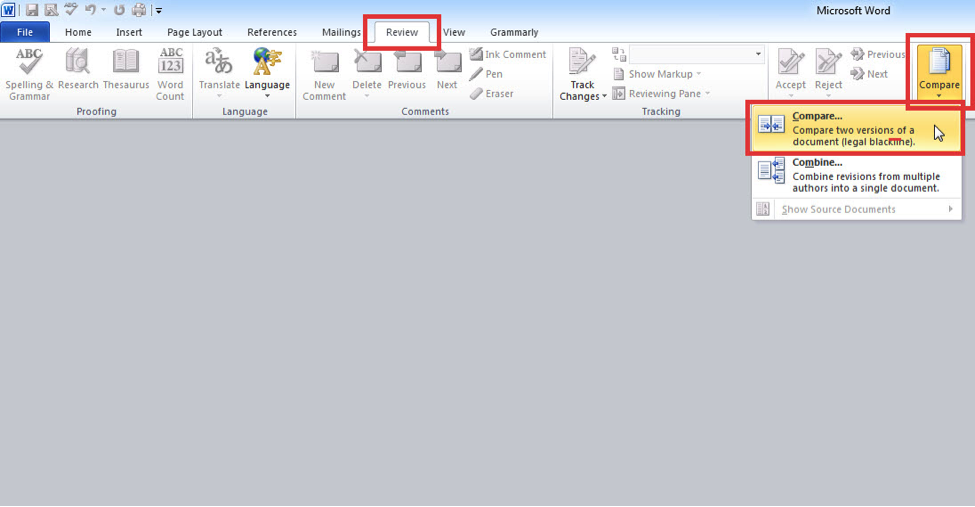
When you click Compare, the following dialog box will open …
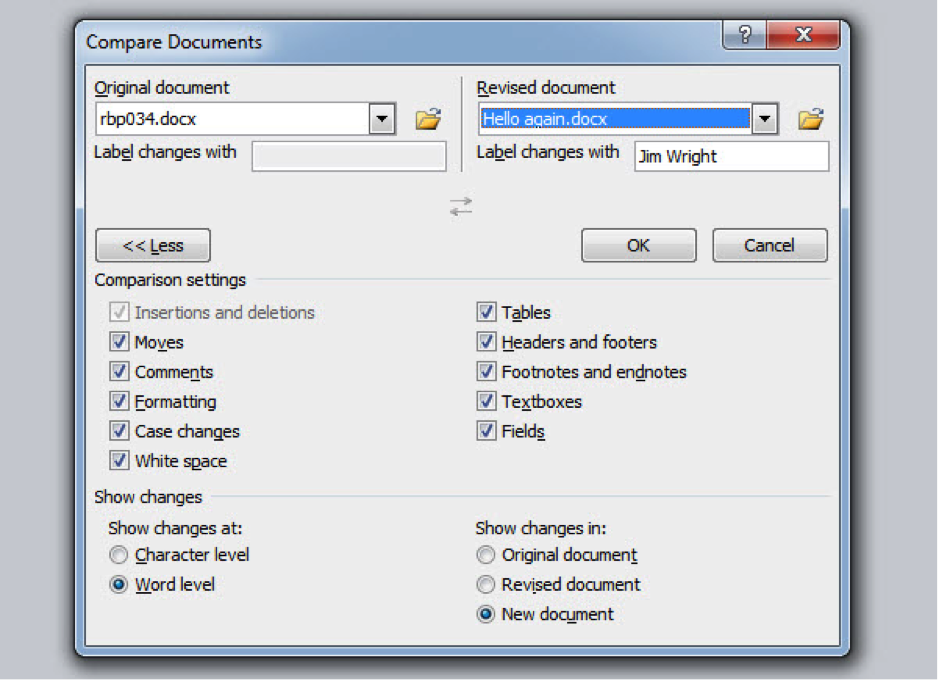
This example uses my most recent Reality Blog post for Wealthy Web Writer. I used the document I submitted (in this example, rbp034.docx) as the original document, and my copy/paste version (Hello again.docx) as the Revised document.
Click OK, and you’ll see both documents …
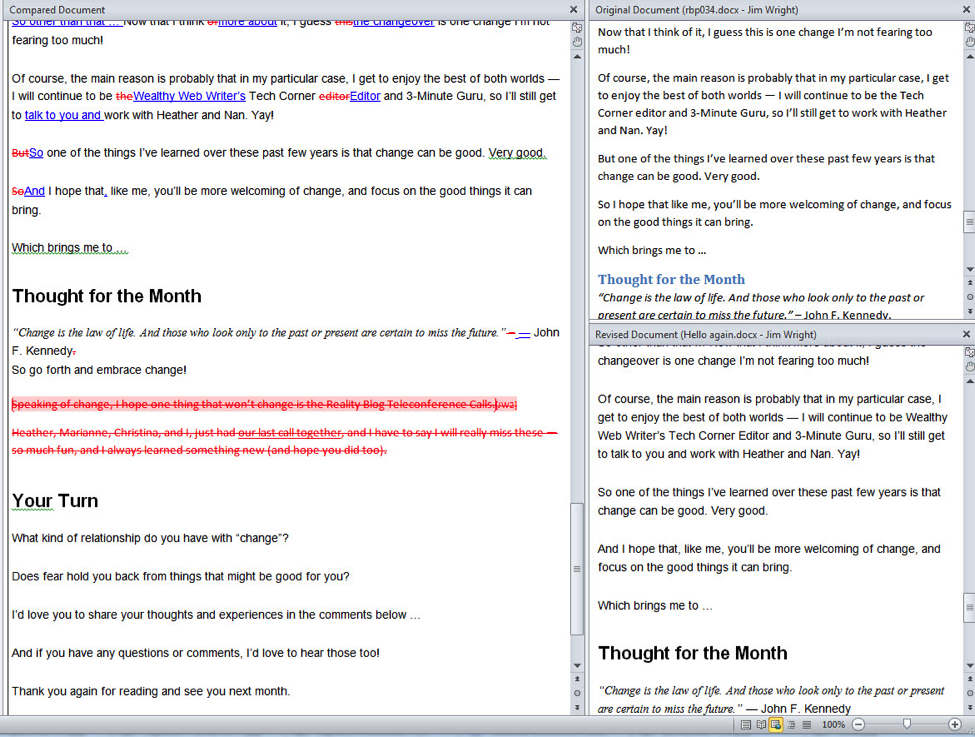
On the right-hand side, you can see my original document on top, and the edited version on the bottom.
In the main pane is a combination of the two showing the differences between both documents.
Looking at this can be humbling at times, but I love finding out what was changed and why.
I sometimes make a game of it to see how “clean” my copy can be. My goal is to have no changes, and although I think that’s almost impossible, it doesn’t stop me from trying!
How This Helps Me
So, why do I do this? Several reasons …
I Learn the Style
Whenever I see changes like the ones I mentioned above, like how to write the writer’s life, or how to handle the emdash, or whether or not certain words are capitalized, I make a note of these items so in my next article, I’ll get them right!
This does two things: First, I learn the editor’s style, and secondly, editors usually appreciate seeing copy from a writer improve in this area, as it makes your work easier and easier to edit.
I Learn My Tendencies
Everyone has a common set of mistakes or tendencies.
Here are a few things I’ve learned about my writing:
- I sometimes mix up the words “of” and “or.”
- I use a lot of commas.
- I use too many exclamation marks!!!
- I sometimes forget to use title case in my titles.
- I write “try and do that” as opposed to “try to do that.”
And, quite a few more things I won’t bore you with (or embarrass myself with!).
However, this information is invaluable.
I Learn My Craft
Armed with this information, before I submit a piece, I now check all my uses of “or” and “of,” I watch my commas, and really watch my exclamation marks!
Specifically, with the exclamation marks, when I compared early documents, I noticed about 40% of my exclamation marks went missing after the editing process. So now, when I use one, I make sure it’s justified, and I watch to make sure I’m not overusing them.
What I’m really doing is pre-editing, and handing in documents I know will be a lot less work for my editors and proofreaders. So, it’s really a win-win — my writing improves, and my pieces are easier to edit.
Try It
I remember reading my published pieces and not even noticing changes that were made until I tried this Compare method for myself. So, I encourage you to try this technique and see what you can learn about your own writing.
Not only will your writing improve, but your editors will be happier to see your submissions in their inbox.
And, the real bonus is that with happy editors comes the opportunity for more projects business. And, ultimately, you’ll be a happier writer.
Like I said … win-win!